
Blog

SaaS Email Marketing: Strategies to Onboard, Engage, & Retain Your Users

Design Effective Lifecycle Email Campaigns
SaaS Email Marketing Strategies To Onboard Engage And Retain Your Users

TL;DR

  • SaaS email marketing drives growth after signup by supporting activation, engagement, and retention, not just acquisition.
  • High-performing SaaS email programs rely on lifecycle-aware, behavior-based automation tied to product usage data.
  • Success should be measured using business outcomes like activation, feature adoption, upgrades, and churn reduction, not just opens and clicks.
  • Clear segmentation, attribution, and continuous testing turn email into a measurable SaaS growth engine.

SaaS email marketing plays a critical role in how users activate, engage with, and continue using a product over time.

Unlike traditional email campaigns focused on promotions or announcements, effective SaaS email strategies are deeply connected to product usage and user behavior across the customer lifecycle.

In this guide, we break down how SaaS teams can design email programs that support onboarding, drive feature adoption, and improve retention.

You will learn how to build lifecycle-aware email flows, measure performance using product and revenue metrics, and use attribution to understand how email contributes to activation, upgrades, and long-term growth.

Why Email Marketing is Critical for SaaS

For SaaS businesses, growth does not end at acquisition. A new signup only becomes valuable when that user activates, adopts key features, and continues to use the product over time. This makes the post-signup experience just as important as demand generation, and email remains one of the most effective channels for influencing what happens after the first click.

Done well, email helps users onboard faster, guides them toward deeper usage, and supports retention and renewal, all at a relatively low cost compared to paid media or sales-driven outreach.

SaaS email marketing also looks fundamentally different from traditional email marketing. Instead of periodic newsletters or one-off promotional blasts, SaaS teams rely heavily on automation and behavior-based triggers.

Emails are sent in response to real user actions, or inaction, such as signing up for a free trial, skipping a key setup step, trying a feature for the first time, or going inactive for a set period.

Because of this tight connection to the product, email performance in SaaS must be measured differently as well. Open and click rates provide limited insight on their own. To understand impact, email campaigns need to be directly linked to user actions, product metrics, and value events like activation, feature adoption, upgrades, and retention.

When email is connected to these downstream outcomes, it becomes a measurable growth lever rather than just a communication channel.

Lifecycle Phases & Email Strategy Breakdown

Effective SaaS email marketing is built around the user lifecycle. By dividing the journey into clear stages, teams can design email strategies that meet users where they are, reinforce the right behaviors at the right time, and move them steadily toward long-term value.

Onboarding & Activation

Goal

  • Help new users reach their first “aha” moment quickly
  • Reduce time-to-value and increase activation rates

Key tactics

  • Welcome email or short welcome sequence
  • Setup checklists to guide initial configuration
  • Feature walkthroughs focused on core value drivers
  • Milestone emails that acknowledge progress and reinforce momentum
  • Structured sequences that move from welcome → activation → feature introduction → progress tracking

Email trigger examples

  • User signs up or starts a free trial
  • User does not complete a key setup step within a defined timeframe
  • User completes their first major product action

Metrics to track

  • Activation rate
  • Time to first value
  • Drop-off rate before the first key action

Engagement & Adoption

Goal

  • Deepen product usage
  • Encourage habitual behavior
  • Unlock premium features and grow value per user

Key tactics

  • Behavior-based emails suggesting next features or actions
  • “You haven’t tried X yet” nudges based on usage gaps
  • Educational content, tutorials, and best practices
  • Case studies or use cases aligned to the user’s role or plan
  • Milestone celebrations to reinforce progress and consistency

Email segmentation examples

  • Usage frequency (power users vs light users)
  • Plan tier or subscription level
  • Features used vs features not yet adopted

Metrics to track

  • Active user counts
  • Feature adoption rates
  • Session recency and frequency
  • Free-to-paid conversion rate, if applicable

Retention, Renewal, & Re-Engagement

Goal

  • Prevent churn
  • Drive renewals and expansions
  • Reclaim inactive or at-risk users

Key tactics

  • Win-back campaigns triggered by inactivity
  • Renewal reminders tied to subscription timelines
  • Loyalty or appreciation emails for long-term customers
  • Referral or advocate-driven campaigns
  • Upsell and cross-sell messages based on demonstrated usage

Metrics to track

  • Churn rate
  • Renewal rate
  • Aggregate lifetime value
  • Reactivation rate of dormant accounts

Email Strategy & Implementation Framework
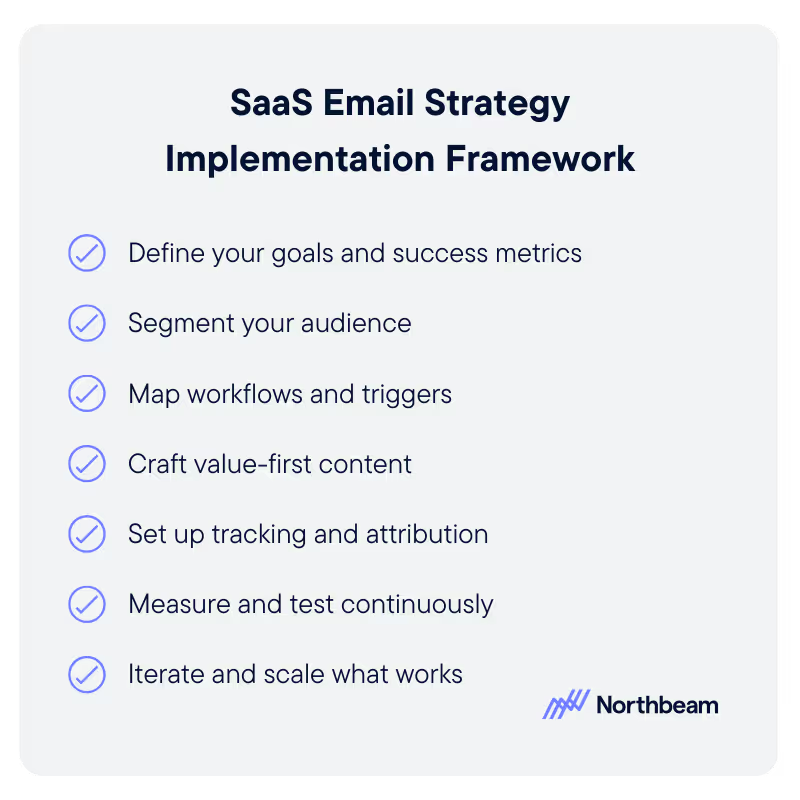
This framework outlines the core steps teams should follow to design, measure, and scale lifecycle-driven email programs.

1. Define Your Goals and Success Metrics

Start by clearly defining what success looks like for each lifecycle stage. Set specific targets for activation rates, reductions in churn, increases in feature adoption, or improvements in conversion from free to paid.

These goals should be directly tied to business outcomes, not just email engagement metrics, so performance can be evaluated in terms of real impact.

2. Segment Your Audience

Segment users based on meaningful differences in their journey and behavior. Common segmentation dimensions include lifecycle stage, product usage patterns, plan tier, and features used.

Strong segmentation ensures that emails remain relevant and timely, which is critical for driving behavior change rather than fatigue.

3. Map Workflows and Triggers

For each lifecycle stage, define the email sequences, triggers, and conditional logic that determine when messages are sent. Identify primary triggers, such as signups or inactivity, as well as fallback flows for users who do not complete key actions.

Clear workflow mapping helps ensure users receive the right message at the right time.

4. Craft Value-First Content

Tailor email content to the user’s current needs and level of maturity. Onboarding users may need guidance and reassurance, while power users may benefit from advanced tips or new features.

Focus on delivering value and clarity rather than promotional messaging, especially in early and mid-lifecycle stages.

5. Set Up Tracking and Attribution

Connect email engagement data to downstream product events such as setup completion, feature usage, upgrades, or renewals. This linkage allows teams to attribute changes in activation, retention, and revenue directly to specific email flows and campaigns.

6. Measure and Test Continuously

Monitor performance across both email-level metrics and product outcomes. Track open and click rates alongside conversion events and drop-off points. Use A/B testing to refine subject lines, content, and workflows based on measurable improvements.

7. Iterate and Scale What Works

Use performance insights to refine segmentation, introduce dynamic content, and expand behavior-based triggers. As programs mature, teams can scale successful flows and explore AI-driven personalization to further optimize relevance and impact.

Attribution & Performance Metrics Specific to SaaS Email Marketing

To understand whether email is truly driving growth in SaaS, teams need to measure performance through the lens of product behavior and revenue outcomes, not just email engagement.

Focus on Business Outcomes, Not Vanity Metrics

Open and click rates offer limited insight on their own. In SaaS, email success should be measured by its impact on activation, feature adoption, upgrades, retention, and churn reduction.

These metrics reflect whether emails are influencing meaningful user behavior and long-term value.

Account for Multi-Touch Attribution Complexity

Email typically works alongside other channels such as in-product messaging, sales outreach, and paid acquisition. Attribution models should account for this by tracking how email contributes across the user journey over time, even when it is not the final touchpoint before conversion or renewal.

Use Funnel-Based Measurement

A funnel-based approach makes attribution more actionable. By tracking how email interactions lead to product actions and ultimately to upgrades or renewals, teams can identify where email is accelerating progress and where users are stalling.

Build Lifecycle-Aligned Dashboards

Dashboards should reflect the SaaS lifecycle rather than isolated email metrics.

Useful views include cohorts grouped by email flow entry, activation rates by cohort, time to first key action, 30-, 60-, and 90-day retention, and upgrade rate differences between engaged and non-engaged users.

Compare Outcomes to Prove Impact

Comparative analysis helps demonstrate email’s true value. For example, comparing users who completed onboarding email sequences with those who did not can reveal retention or activation uplift that can be attributed directly to email programs.

Common Pitfalls & What to Avoid
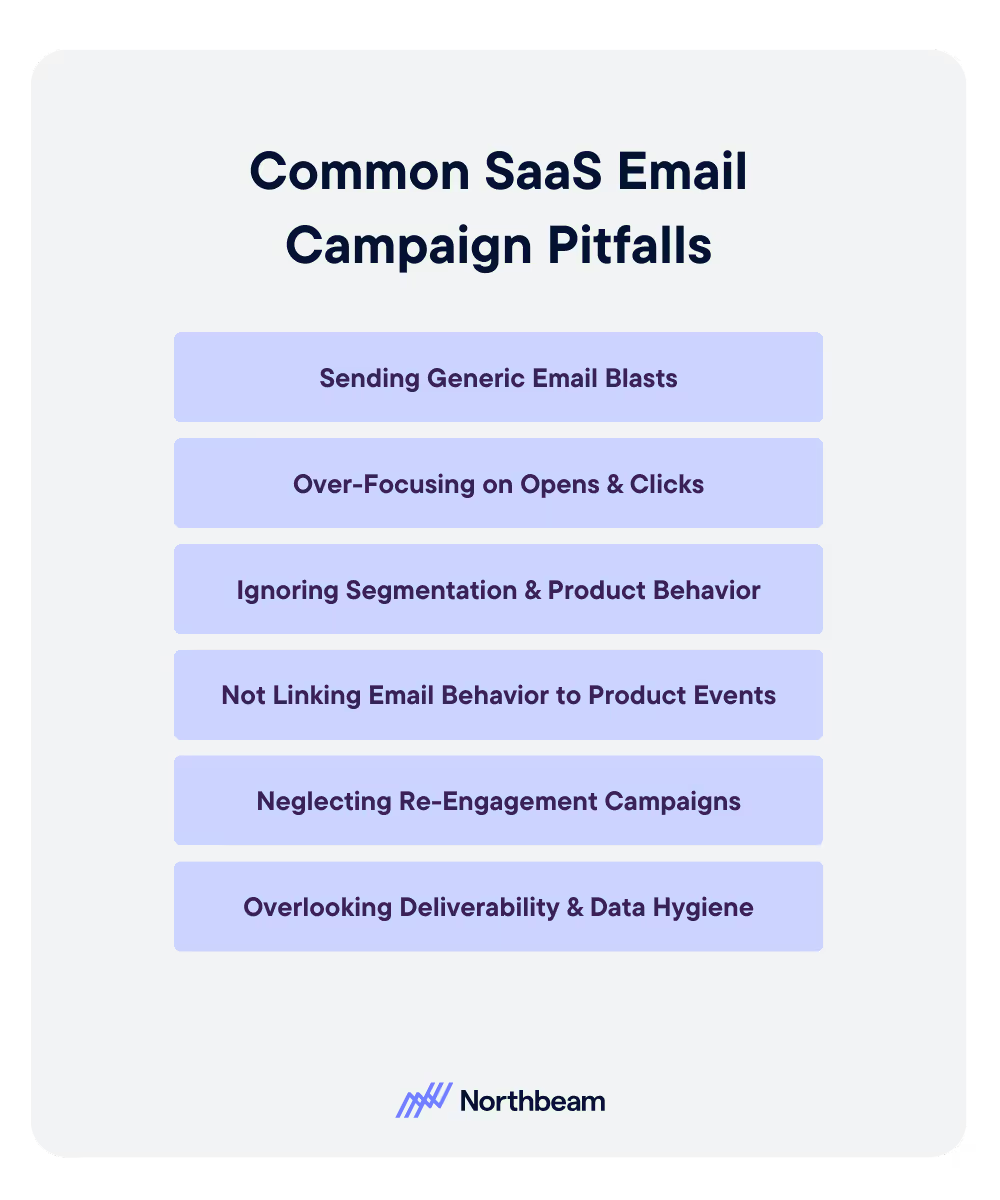
Even well-intentioned SaaS email programs can underperform if they fall into common traps that limit relevance, measurability, and long-term impact.

Sending Generic Email Blasts

Tailor your strategy to your specific goals, such as using email campaigns to reduce churn in SaaS. Relying on one-size-fits-all campaigns instead of lifecycle-aware, behavior-based flows leads to lower user engagement.

Over-Focusing on Opens and Clicks

Measuring success only through user engagement on SaaS emails obscures whether emails are driving activation, adoption, or retention.

Ignoring Segmentation and Product Behavior

Failing to tailor emails based on lifecycle stage, usage patterns, or plan tier results in irrelevant messaging and missed opportunities.

Not Linking Email Behavior to Product Events

When email activity is disconnected from product data, teams cannot accurately measure the impact on activation, upgrades, or retention from SaaS email marketing campaigns.

Neglecting Re-engagement Campaigns

Without investing in how to keep SaaS users engaged via email with proactive win-back and inactivity-triggered emails, users can disengage and churn without clear warning signals.

Overlooking Deliverability and Data Hygiene

Poor list management, outdated data, or deliverability issues can suppress open rates and undermine even well-designed email programs.

A Practical Example of Lifecycle-Driven SaaS Email

Consider a company implementing a SaaS email marketing strategy for onboarding free trial users in order to improve long-term retention.

Rather than relying on a single welcome message, the team designed a structured five-email onboarding sequence aligned to early product behavior:

  • Day 1: Users received a welcome email
  • Day 2: Users received a setup guidance email
  • Day 4: Users received an email introducing a core featured tied to the product’s primary value
  • Day 7: Users who had not yet tried the feature received a behavioral checkpoint email highlighting what they were missing
  • Day 14: Engaged users were presented with a targeted upgrade offer

By tracking product usage alongside email engagement, the team found that users who reached the day four feature email converted to paid plans at a 40% higher rate within 30 days compared to those who did not.

Beyond onboarding, the company applied similar logic to retention. Users who went inactive for 14 days triggered a re-engagement email offering a short webinar or feature tip, which ultimately reduced churn by 12%.

Measurement also informed iteration. Analysis showed that users from one acquisition source consistently activated at lower rates. In response, the team created a separate onboarding path tailored to that cohort’s needs and expectations.

Using product analytics combined with email tagging, they demonstrated that users who completed the full onboarding flow achieved 60% higher retention at 90 days versus the baseline, clearly linking lifecycle email strategy to measurable business impact.

Turning Email Into a SaaS Growth Engine

Email remains one of the most powerful levers SaaS teams have to influence user behavior after signup. When aligned to the lifecycle and informed by product data, email can accelerate activation, deepen engagement, and protect long-term revenue through retention and renewal.

By defining clear goals, segmenting thoughtfully, and continuously testing and iterating based on real user behavior, SaaS teams can build email programs that scale alongside the product and deliver lasting impact across the customer lifecycle.

Continue Reading

5 Takeaways From Moderating C+DV Webinar

5 Takeaways From Moderating Our Clicks+ Deterministic Views Webinar With Leading Platforms

What platform leaders agree on about attribution, deterministic views, and why clicks alone can’t explain modern buying behavior.
Ensuring Data Reliability How To Trust Your Marketing Analytics

Ensuring Data Reliability: How to Trust Your Marketing Analytics

Trustworthy Data for Reporting, Attribution, & Decision-Making
Ad Operations 101: How Digital Ads Get Delivered

Ad Operations 101: How Digital Ads Get Delivered

Ad Ops Systems, Workflows, and Delivery Mechanics
How to Build a Customer Acquisition Funnel (Step-by-Step Guide)

How to Build a Customer Acquisition Funnel (Step-by-Step Guide)

Designing, Measure, and Optimize Customer Acquisition
Mid-Funnel Strategies: Nurturing Prospects from Consideration to Intent

Mid-Funnel Strategies: Nurturing Prospects from Consideration to Intent

Don’t Lose Momentum Mid-Funnel
Measuring Brand Performance How To Track Awareness Loyalty And Perception

Measuring Brand Performance: How to Track Awareness, Loyalty, & Perception

Connect Brand Health to Real Business Impact
Points of Parity vs. Points of Difference: Finding Your Brand’s Competitive Sweet Spot

Points of Parity vs. Points of Difference: Finding Your Brand’s Competitive Sweet Spot

Meet Category Expectations While Standing Out in Meaningful Ways
performance-marketing-channels-guide-to-ppc-affiliates Performance marketing Channels A Guide To PPC Affiliates And More

Performance Marketing Channels: A Guide to PPC, Affiliates, & More

Your end-to-end playbook for selecting the right performance channels
What Is the Meta Conversions API? Implementing Server-Side Tracking in a Privacy-First World

What Is the Meta Conversions API? Implementing Server-Side Tracking in a Privacy-First World

Pair Pixel with CAPI for Accurate Measurements
Gamification Marketing: Using Game Mechanics To Boost Ad Engagement & Attribution

Gamification Marketing: Using Game Mechanics to Boost Ad Engagement & Attribution

How can gamification help your marketing ads and attribution?
LinkedIn Segment Reporting How To Analyze Your Ad Audiences

LinkedIn Segment Reporting: How to Analyze Your Ad Audiences on LinkedIn

Use LinkedIn for Smarter Targeting, Creative, and Budget Decisions
Cyber Week 2025 A Data Driven Look At Performance And Strategy

Cyber Week 2025: A Data‑Driven Look at Performance and Strategy

A data-driven look at how DTC brands actually performed during Cyber Week 2025, and why you should adjust your channel mix, pacing, and benchmarks before next year.
Second Party Data Tapping Into Trusted Partner Data For Marketing

Second-Party Data: Tapping Into Trusted Partner Data for Marketing

A Practical Guide to Partner-Sourced Data
Is Your Company Data Mature Understanding Data Maturity Models For Marketing

Is Your Company Data-Mature? Understanding Data Maturity Models for Marketing

Is Your Team Really “Data Driven?”
Introducing Incrementality By Northbeam: Automated Lift Testing You Can Trust

Introducing Incrementality by Northbeam: Automated Lift Testing You Can Trust

Run incrementality tests end-to-end inside Northbeam—automated design, rigorous validation, and unified results alongside your MTA and MMM for confident, daily decision-making.
Reporting on Marketing Automation Performance: Proving the ROI of Your Drip Campaigns

Reporting on Marketing Automation Performance: Proving the ROI of Your Drip Campaigns

Measure, Attribute, and Prove Business Value
Marketing Funnel Automation Scaling Engagement On Autopilot

Marketing Funnel Automation: Scaling Engagement on Autopilot

Build, Automate, and Measure
Why New Customer ROAS Matters More Than Blended Metrics

Why New Customer ROAS Matters More Than Blended Metrics

Why optimizing to New Customer ROAS (nROAS) — not blended ROAS — is the only way to scale net‑new growth, with a simple daily workflow to make it operational.
Channel Strategy How To Choose The Right Marketing Channels For Your Business

Channel Strategy: How to Choose the Right Marketing Channels for Your Business

Evaluate, Test, and Optimize Your Marketing Channels
Ad Fatigue In Digital Marketing How To Recognize And Remedy It

Ad Fatigue in Digital Marketing: How to Recognize & Remedy It

How to Know When Your Audience Has Seen Enough
Churn Analysis Identifying Why Customers Leave And How To Win Them Back

Churn Analysis: Identifying Why Customers Leave (And How to Win Them Back)

Uncover Churn Drivers and Build Stronger Retention Strategies
Funnel Creation Made Simple How To Map Out Your Marketing Funnel

Funnel Creation Made Simple: How to Map Out Your Marketing Funnel

Map, Measure, and Optimize the Customer Journey
Lifecycle Phase Goal Key Tactics
Onboarding & Activation Help new users reach their first “aha” moment; reduce time-to-value and increase activation rate Welcome emails; setup checklists; feature walkthroughs; milestone emails; structured sequences
Stage Goal Example User Action
Awareness Reach new audiences User sees an Instagram ad about “clean skincare that actually works”
Interest Build curiosity and trust User clicks through to a blog post on ingredient transparency
Consideration Nurture engagement User subscribes to the email list for a “skin quiz” and personalized recommendations
Conversion Drive first purchase User adds a moisturizer to cart and completes checkout
Retention Encourage repeat purchases User receives post-purchase emails, reviews products, and joins the loyalty program

2. Create Content, Offers & Touchpoints

For each stage, they listed targeted content and offers:

  • Awareness: Paid social ads, influencer videos, and UGC TikToks showcasing before/after results.
  • Interest: Blog posts, product comparison charts, and retargeting ads linking to customer stories.
  • Consideration: “Find Your Routine” quiz, 10% off first order email, and Instagram stories with skincare tips.
  • Conversion: Optimized product pages with social proof, free shipping thresholds, and a one-click checkout.
  • Retention: Automated reorder reminders, loyalty points, and referral discounts.

3. Map Flow & Identify Leaks

Once mapped visually, the data revealed a major drop-off between Consideration and Conversion: nearly 40% of email subscribers never returned to the site.

By adding retargeting ads that showcased each user’s quiz results (“Here’s your custom LumaCare routine”), conversion rates rose from 2.1% to 3.6%, and average order value increased by 15%.
4. Track & Instrument

The team used Google Analytics and other marketing intelligence tools to track:

  • Traffic by channel and UTM
  • Quiz completions and email signups
  • Add-to-cart vs. checkout completions
  • Repeat purchase rate

Custom dashboards displayed conversion rates by stage, making it easy to see how each channel performed and where to focus testing.

5. Test & Iterate

Every quarter, LumaCare ran one new test per funnel stage, like changing creative formats for Awareness or simplifying the quiz for Consideration.

Over six months, this consistent testing cycle helped them cut drop-off by 28% and raise customer lifetime value by 22%.

6. Extend the Funnel Beyond Conversion

The final optimization came after purchase. The brand created a “Glow Points” loyalty program and sent reorder prompts when customers’ average product usage time ran out.

This small retention loop turned one-time buyers into brand advocates, closing the loop and fueling the top of the funnel with referral traffic.

The takeaway: By treating their funnel as a living system, LumaCare built a predictable growth engine that turned awareness into advocacy.

Put Your Funnel Map Into Action

You’ve got the framework. Now it’s time to put it to work. 

Funnel mapping isn’t just a planning exercise; it’s a habit that keeps your marketing grounded in data and aligned with real customer behavior.

Start simple:

  • Sketch your funnel. Even a rough version on paper helps you visualize how people move from discovery to conversion.
  • Spot one weak transition. Look for where engagement or conversion drops most sharply. That’s your first test point.
  • Design an experiment. Try a new offer, update messaging, or simplify a step in the journey. Measure what changes.
  • Create a funnel dashboard. Track key metrics (volume, conversion rate, and drop-off by stage) so you can see progress at a glance.

Once you’ve built your first version, keep iterating. The best funnels evolve alongside your audience, product, and market.

When you define clear stages, align content and data, and test continuously, you transform marketing from guesswork into a repeatable growth engine.

Kill Last Click Bias A Simple Playbook For Read During BFCM

Kill Last‑Click Bias: A Simple Playbook for Reads During BFCM

A practical, windowed-read playbook—short for capture, longer for prospecting—to avoid last‑click bias during Cyber Five.
The Cyber Five Pattern What To Expect Heading Into BFCM

The Cyber Five Pattern: What to expect Heading Into BFCM

Planning Cyber Five with pattern‑based pacing and clear measurement reads.
What Is MAU Tracking Monthly Active Users To Gauge Growth

What Is MAU? Tracking Monthly Active Users to Gauge Growth

Learn what Monthly Active Users (MAU) means, how to measure it accurately, and how to use MAU trends to improve product engagement, retention, and growth.
User Segmentation Strategies How To Personalize Marketing For Every Audience

User Segmentation Strategies: How to Personalize Marketing for Every Audience

Learn how to build and activate user segments that power personalized marketing, boost engagement, and drive long-term customer loyalty.
Which Campaigns Benefit Most From CDV

Which Campaigns Benefit Most from C+DV? Prospecting, Reach/Traffic, and Retention by the Numbers

Learning How C+DV Evens the Playing Field
Fogg Behavior Model: Motivation, Ability, and Prompts

Fogg Behavior Model: Motivation, Ability, and Prompts

Apply Behavior Design Principles to Your Marketing Strategy
Lifecycle Marketing 101 For Every Stage Of The Customer Journey

Lifecycle Marketing 101: Engaging Customers at Every Stage of the Journey

Build Customer Relationships That Last

Benchmarks & Stoplights: Turning Data Into Daily Decisions for Ad Optimization

Turn your best performance days into a live decision system with clear green, yellow, and red signals—so your team knows exactly when to scale, pause, or pivot.
Behavioral Data In Marketing How User Behavior Drives Growth

Behavioral Data In Marketing: How User Behavior Drives Growth

Optimize journeys and personalize experiences
Cohort Analysis For Marketers Uncovering Trends In Customer Behavior

Cohort Analysis for Marketers: Uncovering Trends In Customer Behavior

Learn how to use cohort analysis to track retention, forecast LTV, and drive sustainable growth.
User Stickiness How To Measure Customer Engagement Metric

User Stickiness: The Metric to Measure Customer Engagement (and How to Improve It)

Discover how to calculate and improve user stickiness (DAU/MAU) — the key metric for measuring customer engagement and loyalty.

The PESO Model: Integrating Paid, Earned, Shared, and Owned Media

Learn how the PESO model unifies Paid, Earned, Shared, and Owned media into one powerful strategy.
reasons your awarness campaigns arent driving revenue

7 Reasons Your Awareness Campaigns Aren’t Driving Revenue

How evolving attribution models, creative strategy, and platform dynamics are redefining top-of-funnel success this BFCM season.

How Omnilux Drove a 659% ROAS Lift on Pinterest with Northbeam’s Clicks + Deterministic Views

A case study with Northbeam's newest attribution model.
Clicks + Deterministic Views, by Northbeam.

Introducing Clicks + Deterministic Views by Northbeam

A revolutionary new viewthrough model, now available in Northbeam.

Contextual Targeting In Advertising: Reaching Audiences Without Cookies

Discover how contextual targeting delivers privacy-first, high-performing ads without cookies.

First vs Second vs Third-Party Data: What Are They and Why They Matter

Learn the differences between first-, second-, and third-party data.

Zero-Party Data: The New Gold Standard in Privacy-First Marketing

Learn best practices for collection, activation, and governance to drive trust and ROI.
The Explore Exploit Cycle Of Meta's Algorithm

The Explore–Exploit Cycle of Meta’s Algorithm

Why Meta’s algorithm makes performance swing — and how to ride the cycle instead of panicking through the dips.
what-is-gclid-complete-guide-to-google-click-identifier

What Is GCLID? Complete Guide to Google Click Identifier

Learn what GCLID is, how it works, and why it’s essential for accurate Google Ads tracking.
beyond roas fundamentals of advertising hero

Beyond ROAS: Fundamentals of Advertising In 2025

Why relying on ROAS alone can stunt growth—and the metrics that reveal if your ads are truly building a brand.

iOS 26 Won’t Kill Your UTMs – Here’s Proof

Despite headlines warning of doom, our testing shows iOS 26 leaves Northbeam’s UTMs untouched.
what-is-fcblid-guide-to-facebook-click-identifiers-and-tracking-ad-performance

What is fbclid? A Complete Guide to Facebook Click Identifiers and Tracking Ad Performance

This small URL parameter powers big improvements in Meta ad attribution

What Is Data-Driven Marketing? A Complete Guide to Transforming Your Marketing Strategy with Data

Leverage data to improve your marketing strategies

Why You Should Care About MTA, MMM, and Incrementality

Transform Your Marketing Performance
A futuristic cityscape with a glowing digital figure and a person studying analytics, symbolizing insights into Return on Ad Spend and mastering return on ad spend, with the Northbeam logo and text overlay.

What Is ROAS? A Beginner’s Guide to Return on Ad Spend

Learn why ROAS matters and how to maximize your returns
What makes Northbeam data different

What Makes Northbeam Data Different?

Not All Data is Created Equally

What to Expect When Switching to Northbeam

Everything You Need to Know When You Try Out Northbeam
Illustration of pixel tracking concept with magnifying glass over mechanical gears, symbolizing data analysis, and Northbeam logo in the top corner. Text reads: 'What is Pixel Tracking?

What is Pixel Tracking?

Unlock the Power of Pixel Tracking for Better Marketing Insights
What is Multi-Touch Attribution (MTA)?

Multi-Touch Attribution Models: A Complete Guide to Measuring Every Marketing Touchpoint

Understand, compare, and implement MTA for smarter marketing measurement

What is Media Mix Modeling (MMM)?

Wondering what exactly comprises Media Mix Modeling? Get a comprehensive overview of MMM

What is Marketing ROI and How Can You Improve It?

Understand and enhance your marketing ROI
Image of a man utilizing applovin on his phone and measuring the impact of his adds using Northbeam, the multi touch attribution solution for profitable growth

What is AppLovin and How to Leverage it For Marketing Success

Why DTC brands are flocking to AppLovin, and how to make it work for you

What is Marketing Intelligence Software?

Capture the right data for informed marketing decisions
This highlights key marketing metrics with a creative scene of a strategist building a futuristic ship, symbolizing innovation and long-term success strategies, with the Northbeam logo and text overlay.

Top Marketing Metrics to Track for Long-Term Success

Track these essential metrics to drive sustainable growth

What Is Incrementality In Marketing? A Guide to Measuring True Campaign Impact

The Critical Role of Attribution Models in Unlocking Growth
Northbeam presents a marketer’s guide to customer journey mapping, featuring a relaxed professional at a desk, symbolizing strategic planning and marketing success.

The Marketer’s Guide to Customer Journey Mapping

Turn messy customer paths into data-driven strategies for growth

The Future with YouTube Advertising

Navigating rising digital ad costs with Northbeam

The Marketer’s Guide to AI

How modern marketers can best harness the power of AI
Super Bowl Football Field with the Super Bowl logo and Northbeam logo sitting on the 50 yard line

Super Bowl 2025 Advertising Trends & Performance Analysis

The Big Game, Big Spends, and Even Bigger Marketing Moves

Performance Benchmarks: Black Friday Cyber Monday 2023

A look into this year's performance compared to last year.

Serious Data For Serious Growth: How Northbeam Enables HexClad To Stay Efficient with Scale

Leveraging Northbeam for scalable efficiency

The 2024 Guide to Incrementality

A guide to measuring marketing impact

Northbeam's Definitive Guide to Q5 2025

A Northbeam guide to the "hidden" fifth quarter
Abstract illustration showcasing individuals standing on interconnected platforms with glowing gears, representing probabilistic and deterministic approaches in a cookieless future, with the Northbeam logo and text overlay.

Probabilistic vs. Deterministic Attribution Approaches In a Cookieless Future

Combine probabilistic and deterministic models for future-proof attribution

How Will Cookie Deprecation Affect Northbeam? An Explainer

Northbeam's resilience amid third-party cookie deprecation
Northbeam showcases a futuristic city with holographic figures, drones, and digital interfaces, guiding ecommerce brands on Meta's new sensitivity category restrictions.

Meta’s Sensitivity Category Restrictions: A Guide for Ecommerce Brands

How to get to grips with Meta's privacy restrictions

Beyond Walled Gardens: How Marketers Can Thrive in a Fragmented Digital Landscape

Embrace open web strategies in the evolving digital ad landscape
How to Not Get Fired: A 5-Step Guide for CMOs

How To Not Get Fired: A 5-Step Guide for CMOs

Secure your role amid a shifting marketing landscape

Media Mix Modeling (MMM): Build or Buy?

Evaluating the best approach to implementing MMM

Marketing Efficiency Ratio (MER): Definition, Benchmarks, and How it Differs from ROAS

Use MER and ROAS Together for Smarter Decisions
Northbeam is powered by AI, and so will you.

How does Northbeam use AI?

Northbeam's advanced ML models enhance marketing performance
Cost per clicks

Do Cost Per Clicks Matter?

Evaluating the significance of CPC in performance marketing

Google Chrome Won’t be Deprecating Cookies — Yet

Google's decision to retain third-party cookies, and what it means for you
Utm Tracking 101 How To Use Utm Parameters To Measure Campaigns

UTM Tracking 101: How to Use UTM Parameters to Measure and Improve Campaign Performance

Learn how to use UTM parameters to track campaign performance, improve attribution, and optimize ROI with this step-by-step guide for marketers.
Northbeam presents Black Friday and Cyber Monday 2024 predictions and performance with a futuristic digital sphere, symbolizing data-driven insights and analysis.

BFCM 2024 Predictions: How Did We Do?

Wins, surprises, and lessons for 2025
Northbeam presents a seamless omnichannel marketing strategy with a historical meeting room and futuristic digital elements, symbolizing innovation and best practices.

Creating a Seamless Omnichannel Marketing Strategy: Tips & Best Practices

Mastering Omnichannel Marketing by creating a Seamless, Data-Driven Customer Journey
Northbeam highlights customer retention with an elegant historical setting, symbolizing long-term relationships and why retention should be every marketer’s priority.

Beyond Acquisition: Why Retention Should Be Every Marketer’s Priority

Shifting Focus: Why Retention Is the Key to Sustainable Growth and Profitability
Company Northbeam creates an ad spend optimization with a vintage airplane in a high-tech workshop, symbolizing innovation and maximizing Return on Investment from every marketing dollar.

Ad Spend Optimization: How to Get More ROI from Every Marketing Dollar

Stop Wasting Ad Spend: How Smarter Strategies and Tools Can Maximize ROI
Futuristic laboratory scene with advanced technology screens, DNA graphics, and a scientist analyzing data, representing innovation strategies for return on investment with Northbeam during economic uncertainty, with the Northbeam logo and text overlay.

5 Strategies to Maximize ROI During Economic Uncertainty

Use data-driven techniques to thrive during challenging times
a vibrant digital marketing control room with gears, graphs, and data screens, illustrating insights from a beginner's guide to marketing attribution, with a Northbeam logo and overlay.

A Beginner’s Guide to Marketing Attribution: Understanding the Fundamentals

Learn what marketing attribution is and how to harness its power in an ever-changing digital landscape
Northbeam is the perfect tool for performance marketing agencies.

5 Reasons Why Northbeam is the Perfect Tool for Performance Marketing Agencies

The Last Thing You Should Worry About Is Accurate Data

Accounting Modes 101: What Marketers Need to Know

Understanding cash snapshot and accrual performance modes

2025 Marketing Trends to Watch Out For: Part 2

CTV growth, evolving search, nano-influencers, and data privacy

2025 Marketing Trends to Watch Out For: Part 1

Navigating a Shifting Landscape of Generative AI, Social Media, and Data Privacy

It's time to take your marketing

to the next level.

Chat with our team and discover how Northbeam can transform your business.
book a demo