

Blog

What Is the Meta Conversions API? Implementing Server-Side Tracking in a Privacy-First World

Pair Pixel with CAPI for Accurate Measurements
What Is the Meta Conversions API? Implementing Server-Side Tracking in a Privacy-First World

TL;DR

  • Pixel-only tracking is increasingly limited by ad blockers, cookie loss, and browser restrictions, which weakens attribution and optimization.
  • The Meta Conversions API sends conversion events from your server rather than the browser, giving Meta more reliable data in a privacy-focused environment.
  • Running Pixel plus CAPI together improves event match quality, strengthens targeting signals, and produces more accurate ROAS and funnel measurement.

Marketers are feeling the impact of a changing privacy landscape. Browser restrictions, tracking prevention, and stricter consent rules have made it harder for the Meta Pixel to capture the full picture of what happens after someone clicks an ad.

As a result, attribution becomes blurry, optimization signals get weaker, and teams waste spend on conversions that never make it back into their reporting.

The Meta Conversions API (CAPI) helps solve that problem. Instead of relying on the browser, CAPI sends events directly from your server to Meta. This gives you a more complete, consistent view of your funnel, even when users block cookies or use privacy focused tools.

When Meta receives higher quality data, it can optimize more efficiently, build stronger audiences, and return more accurate performance insights.

In this guide, we’ll walk through:

  • What the Meta Conversions API is and why it matters
  • How CAPI differs from pixel based tracking
  • How to implement Meta Conversions API
  • The impact on attribution, data quality, and privacy
  • Actionable next steps for your team

Let’s dive in.

What the Meta Conversions API Is & Why It Matters
The Meta Conversions API (CAPI) is a server-to-server method of sending conversion events directly from your backend to Meta’s advertising platform.

Instead of relying solely on the browser-based Meta Pixel to capture actions like purchases, leads, or add to carts, CAPI transmits those events from your server environment, giving Meta a more stable and complete view of what actually happened after someone clicked or viewed an ad.

This shift matters because the traditional pixel model is under increasing pressure.

Third party cookies are being deprecated, browsers are tightening default privacy settings, regulations like GDPR and CCPA require stricter consent handling, and ad blockers routinely prevent client side scripts from firing.

CAPI helps close those gaps: when your server sends verified events with hashed identifiers, Meta can match more conversions back to ad interactions, improve attribution accuracy, and strengthen delivery optimization.

Higher event match quality leads to better targeting, clearer measurement of your funnel, and more efficient use of paid media budgets.

How the Meta Conversions API Differs from Client-Side (Pixel) Tracking

The Meta Pixel is a browser-based script that fires when a user takes an action on your site. It is simple to install and still valuable, but it depends on the user’s device and browser environment.

If a customer blocks cookies, clears their cache, uses a privacy focused browser, or runs an ad blocker, the pixel may never fire.

This means missing or incomplete data, especially for lower funnel events where accuracy matters most.

The Meta Conversions API works differently. Instead of relying on the browser, CAPI sends events from your server to Meta.

Server-side events are not affected by ad blockers, cookie deletion, or tracking prevention features, so they tend to be more reliable and consistent. They also allow you to include richer, privacy safe data like hashed email or phone numbers, which improves event match quality.

Meta recommends running both the Pixel and CAPI together. A dual setup provides maximum coverage, and Meta can deduplicate events when both versions fire, ensuring clean reporting without double counting.

By pairing both methods you gain more dependable conversion tracking, stronger match rates, the ability to capture offline or cross device events, and a more complete attribution picture across your funnel.

Implementation Steps & Technical Considerations
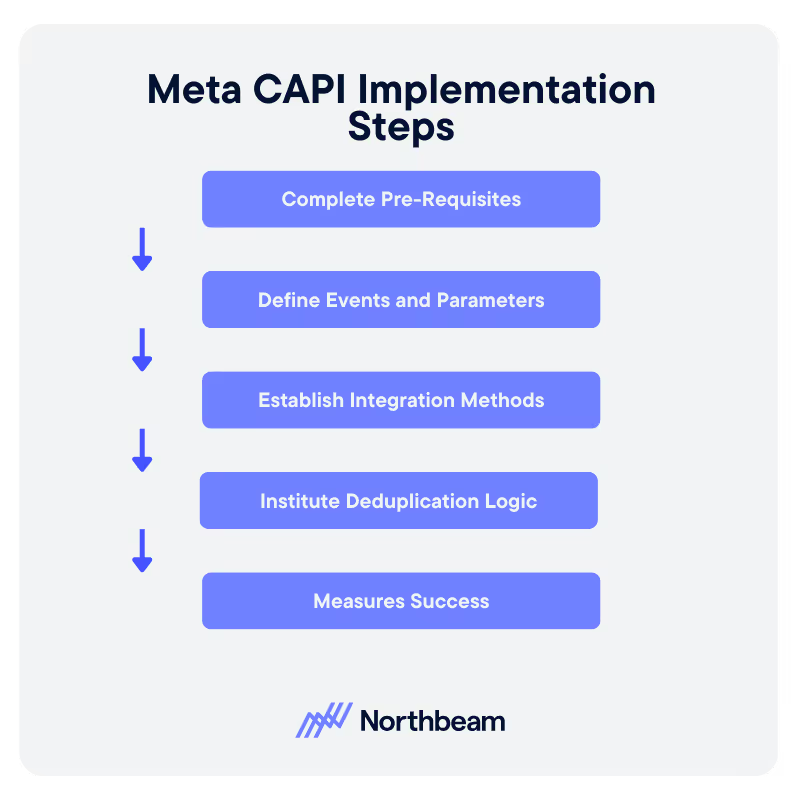
Getting the Meta Conversions API up and running requires a bit more setup than installing a pixel, but the payoff is higher quality data and stronger attribution.

The steps below outline the core pieces teams should plan for before integrating CAPI into their marketing and analytics stack:

1. Complete Pre-Requisites

Before you begin, confirm that your tagging and analytics setup is in good shape. You will need access to Meta Events Manager, a server environment or a supported partner platform, and clarity on which conversion events matter most for your funnel.

Many teams also loop in engineering early to support authentication, data formatting, and endpoint configuration.

2. Define Events and Parameters

CAPI requires specific fields to be sent with each event. At minimum, you will define the event_name, event_time, user_data such as hashed email or phone number, and custom_data like value or currency for revenue based events.

The richer and cleaner these parameters are, the higher your event match quality will be.

3. Establish Integration Methods

You can send events directly through the API, use a partner integration, or set up server-side tracking for Meta ad attribution.

The best option depends on your internal resources and how much control you want over data handling.

4. Institute Deduplication Logic

If you run both Pixel and CAPI, you must assign an event_id to each event so Meta can match and deduplicate them. This prevents double counting while still giving you full coverage.

5. Measure Success

After implementation, monitor Event Match Quality (EMQ), compare pixel versus server event volumes, and verify that values and timestamps are consistent.

Strong EMQ and stable event counts indicate a healthy CAPI setup.

Attribution, Data Quality, & Privacy Implications

Implementing the Meta Conversions API has meaningful effects on how your team measures performance, manages data, and maintains compliance in a privacy first environment.

CAPI strengthens attribution, improves the quality of optimization signals, and gives you greater control over how user information is handled. At the same time, it introduces technical considerations that teams should plan for before rollout.

How CAPI Improves Attribution

Server side events are more reliable than browser based pixel events, which are easily disrupted by tracking prevention tools.

When Meta receives more complete conversion data, it can match a higher percentage of events back to ad interactions. This leads to clearer attribution paths, stronger audience building, and more efficient budget allocation across your campaigns.

Data Governance and Privacy

Because CAPI sends events from your server, you control which information is collected, how it is hashed, and when it is transmitted.

This makes it easier to enforce consent requirements and limit personal data exposure, helping you stay aligned with frameworks like GDPR and CCPA.

Key Trade Offs

CAPI increases accuracy, but it does not eliminate the need for client-side tracking. Some signals still require the pixel, and the combined setup introduces technical overhead.

Teams should expect ongoing maintenance, monitoring, and coordination across marketing and engineering to keep the system healthy.

Actionable Next Steps for Marketing Teams
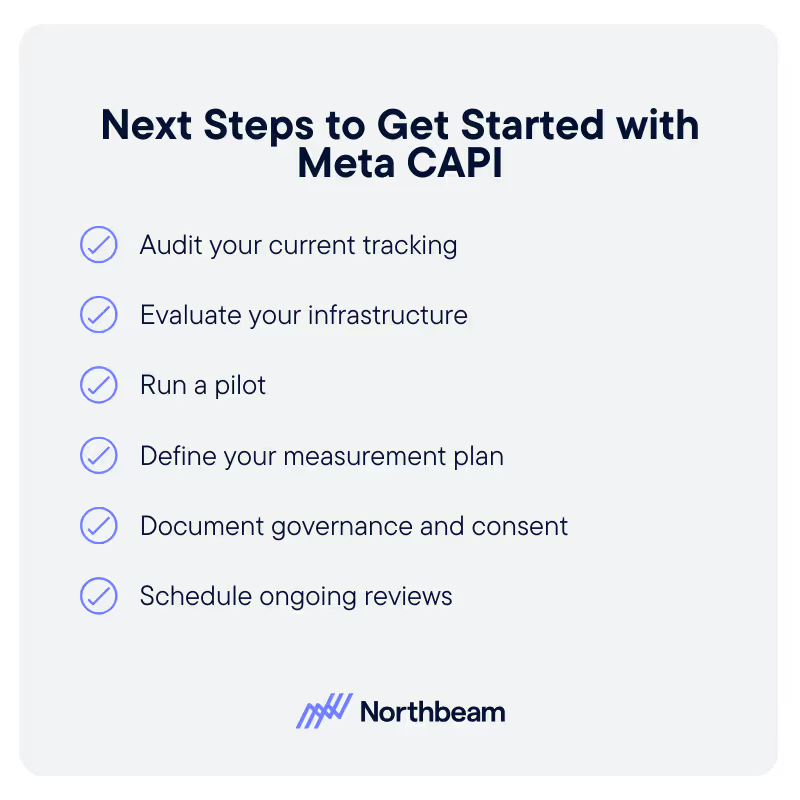
Implementing the Meta CAPI does not need to be done all at once. Most teams see the best results by approaching CAPI in structured phases, starting with an audit and moving toward measurement and ongoing optimization.

The steps below offer a practical roadmap any marketing, analytics, or growth team can use.

Audit Your Current Tracking

Begin by identifying where pixel-only tracking is falling short.

Look for gaps caused by ad blockers, discrepancies between platform conversions, or offline events that never reach Meta.

This baseline will help you understand the size of the opportunity and prioritize which events matter most.

Evaluate Your Infrastructure

Decide how you plan to approach conversion API implementation. Options include direct API integration, partner platforms, or a server side tagging setup through Google Tag Manager.

Run a Pilot

Start small. Choose one high-value event such as Purchase or Lead, implement CAPI alongside your pixel, and monitor performance. Early pilots help validate your setup before scaling.

Define Your Measurement Plan

Track Event Match Quality (EMQ), matched conversion counts, ROAS changes, and reductions in untracked conversions. These metrics show whether CAPI is improving optimization signals and attribution accuracy.

Document Governance and Consent

Ensure your consent policies are enforced consistently. Hash identifiers properly, secure data flows, and keep clear documentation of what information is being sent to Meta.

Schedule Ongoing Reviews

Plan monthly or quarterly check-ins to review data health, deduplication accuracy, and attribution impact. CAPI is most effective when it is maintained as an active part of your analytics and optimization workflow.

The Path to Reliable, Privacy-First Attribution

As privacy standards evolve, the days of relying solely on pixel-based tracking are behind us.

The Meta CAPI enables marketers to maintain privacy-first tracking and accurate measurements while giving Meta the high-quality signals it needs to optimize campaigns.

When paired with the pixel, CAPI fills the gaps left by browser limitations, improves attribution clarity, and strengthens the link between ad spend and real business outcomes.

But you don’t need to overhaul your stack overnight.

Start with an audit, run a focused pilot, and build a clear measurement framework. From there, refine your governance and revisit performance regularly.

With the right setup, CAPI becomes a foundation for reliable data, smarter targeting, and more efficient growth in a privacy-first world.

Continue Reading

Ad Operations 101: How Digital Ads Get Delivered

Ad Operations 101: How Digital Ads Get Delivered

Ad Ops Systems, Workflows, and Delivery Mechanics
How to Build a Customer Acquisition Funnel (Step-by-Step Guide)

How to Build a Customer Acquisition Funnel (Step-by-Step Guide)

Designing, Measure, and Optimize Customer Acquisition
Mid-Funnel Strategies: Nurturing Prospects from Consideration to Intent

Mid-Funnel Strategies: Nurturing Prospects from Consideration to Intent

Don’t Lose Momentum Mid-Funnel
Measuring Brand Performance How To Track Awareness Loyalty And Perception

Measuring Brand Performance: How to Track Awareness, Loyalty, & Perception

Connect Brand Health to Real Business Impact
Points of Parity vs. Points of Difference: Finding Your Brand’s Competitive Sweet Spot

Points of Parity vs. Points of Difference: Finding Your Brand’s Competitive Sweet Spot

Meet Category Expectations While Standing Out in Meaningful Ways
performance-marketing-channels-guide-to-ppc-affiliates Performance marketing Channels A Guide To PPC Affiliates And More

Performance Marketing Channels: A Guide to PPC, Affiliates, & More

Your end-to-end playbook for selecting the right performance channels
Gamification Marketing: Using Game Mechanics To Boost Ad Engagement & Attribution

Gamification Marketing: Using Game Mechanics to Boost Ad Engagement & Attribution

How can gamification help your marketing ads and attribution?
LinkedIn Segment Reporting How To Analyze Your Ad Audiences

LinkedIn Segment Reporting: How to Analyze Your Ad Audiences on LinkedIn

Use LinkedIn for Smarter Targeting, Creative, and Budget Decisions
Cyber Week 2025 A Data Driven Look At Performance And Strategy

Cyber Week 2025: A Data‑Driven Look at Performance and Strategy

A data-driven look at how DTC brands actually performed during Cyber Week 2025, and why you should adjust your channel mix, pacing, and benchmarks before next year.
Second Party Data Tapping Into Trusted Partner Data For Marketing

Second-Party Data: Tapping Into Trusted Partner Data for Marketing

A Practical Guide to Partner-Sourced Data
Is Your Company Data Mature Understanding Data Maturity Models For Marketing

Is Your Company Data-Mature? Understanding Data Maturity Models for Marketing

Is Your Team Really “Data Driven?”
Introducing Incrementality By Northbeam: Automated Lift Testing You Can Trust

Introducing Incrementality by Northbeam: Automated Lift Testing You Can Trust

Run incrementality tests end-to-end inside Northbeam—automated design, rigorous validation, and unified results alongside your MTA and MMM for confident, daily decision-making.
Reporting on Marketing Automation Performance: Proving the ROI of Your Drip Campaigns

Reporting on Marketing Automation Performance: Proving the ROI of Your Drip Campaigns

Measure, Attribute, and Prove Business Value
Marketing Funnel Automation Scaling Engagement On Autopilot

Marketing Funnel Automation: Scaling Engagement on Autopilot

Build, Automate, and Measure
Why New Customer ROAS Matters More Than Blended Metrics

Why New Customer ROAS Matters More Than Blended Metrics

Why optimizing to New Customer ROAS (nROAS) — not blended ROAS — is the only way to scale net‑new growth, with a simple daily workflow to make it operational.
Channel Strategy How To Choose The Right Marketing Channels For Your Business

Channel Strategy: How to Choose the Right Marketing Channels for Your Business

Evaluate, Test, and Optimize Your Marketing Channels
Ad Fatigue In Digital Marketing How To Recognize And Remedy It

Ad Fatigue in Digital Marketing: How to Recognize & Remedy It

How to Know When Your Audience Has Seen Enough
Churn Analysis Identifying Why Customers Leave And How To Win Them Back

Churn Analysis: Identifying Why Customers Leave (And How to Win Them Back)

Uncover Churn Drivers and Build Stronger Retention Strategies
Funnel Creation Made Simple How To Map Out Your Marketing Funnel

Funnel Creation Made Simple: How to Map Out Your Marketing Funnel

Map, Measure, and Optimize the Customer Journey
Kill Last Click Bias A Simple Playbook For Read During BFCM

Kill Last‑Click Bias: A Simple Playbook for Reads During BFCM

A practical, windowed-read playbook—short for capture, longer for prospecting—to avoid last‑click bias during Cyber Five.
The Cyber Five Pattern What To Expect Heading Into BFCM

The Cyber Five Pattern: What to expect Heading Into BFCM

Planning Cyber Five with pattern‑based pacing and clear measurement reads.
What Is MAU Tracking Monthly Active Users To Gauge Growth

What Is MAU? Tracking Monthly Active Users to Gauge Growth

Learn what Monthly Active Users (MAU) means, how to measure it accurately, and how to use MAU trends to improve product engagement, retention, and growth.
User Segmentation Strategies How To Personalize Marketing For Every Audience

User Segmentation Strategies: How to Personalize Marketing for Every Audience

Learn how to build and activate user segments that power personalized marketing, boost engagement, and drive long-term customer loyalty.
Which Campaigns Benefit Most From CDV

Which Campaigns Benefit Most from C+DV? Prospecting, Reach/Traffic, and Retention by the Numbers

Learning How C+DV Evens the Playing Field
Fogg Behavior Model: Motivation, Ability, and Prompts

Fogg Behavior Model: Motivation, Ability, and Prompts

Apply Behavior Design Principles to Your Marketing Strategy
Lifecycle Marketing 101 For Every Stage Of The Customer Journey

Lifecycle Marketing 101: Engaging Customers at Every Stage of the Journey

Build Customer Relationships That Last

Benchmarks & Stoplights: Turning Data Into Daily Decisions for Ad Optimization

Turn your best performance days into a live decision system with clear green, yellow, and red signals—so your team knows exactly when to scale, pause, or pivot.
Behavioral Data In Marketing How User Behavior Drives Growth

Behavioral Data In Marketing: How User Behavior Drives Growth

Optimize journeys and personalize experiences
Cohort Analysis For Marketers Uncovering Trends In Customer Behavior

Cohort Analysis for Marketers: Uncovering Trends In Customer Behavior

Learn how to use cohort analysis to track retention, forecast LTV, and drive sustainable growth.
User Stickiness How To Measure Customer Engagement Metric

User Stickiness: The Metric to Measure Customer Engagement (and How to Improve It)

Discover how to calculate and improve user stickiness (DAU/MAU) — the key metric for measuring customer engagement and loyalty.

The PESO Model: Integrating Paid, Earned, Shared, and Owned Media

Learn how the PESO model unifies Paid, Earned, Shared, and Owned media into one powerful strategy.
reasons your awarness campaigns arent driving revenue

7 Reasons Your Awareness Campaigns Aren’t Driving Revenue

How evolving attribution models, creative strategy, and platform dynamics are redefining top-of-funnel success this BFCM season.

How Omnilux Drove a 659% ROAS Lift on Pinterest with Northbeam’s Clicks + Deterministic Views

A case study with Northbeam's newest attribution model.
Clicks + Deterministic Views, by Northbeam.

Introducing Clicks + Deterministic Views by Northbeam

A revolutionary new viewthrough model, now available in Northbeam.

Contextual Targeting In Advertising: Reaching Audiences Without Cookies

Discover how contextual targeting delivers privacy-first, high-performing ads without cookies.

First vs Second vs Third-Party Data: What Are They and Why They Matter

Learn the differences between first-, second-, and third-party data.

Zero-Party Data: The New Gold Standard in Privacy-First Marketing

Learn best practices for collection, activation, and governance to drive trust and ROI.
The Explore Exploit Cycle Of Meta's Algorithm

The Explore–Exploit Cycle of Meta’s Algorithm

Why Meta’s algorithm makes performance swing — and how to ride the cycle instead of panicking through the dips.
what-is-gclid-complete-guide-to-google-click-identifier

What Is GCLID? Complete Guide to Google Click Identifier

Learn what GCLID is, how it works, and why it’s essential for accurate Google Ads tracking.
beyond roas fundamentals of advertising hero

Beyond ROAS: Fundamentals of Advertising In 2025

Why relying on ROAS alone can stunt growth—and the metrics that reveal if your ads are truly building a brand.

iOS 26 Won’t Kill Your UTMs – Here’s Proof

Despite headlines warning of doom, our testing shows iOS 26 leaves Northbeam’s UTMs untouched.
what-is-fcblid-guide-to-facebook-click-identifiers-and-tracking-ad-performance

What is fbclid? A Complete Guide to Facebook Click Identifiers and Tracking Ad Performance

This small URL parameter powers big improvements in Meta ad attribution

What Is Data-Driven Marketing? A Complete Guide to Transforming Your Marketing Strategy with Data

Leverage data to improve your marketing strategies

Why You Should Care About MTA, MMM, and Incrementality

Transform Your Marketing Performance
A futuristic cityscape with a glowing digital figure and a person studying analytics, symbolizing insights into Return on Ad Spend and mastering return on ad spend, with the Northbeam logo and text overlay.

What Is ROAS? A Beginner’s Guide to Return on Ad Spend

Learn why ROAS matters and how to maximize your returns
What makes Northbeam data different

What Makes Northbeam Data Different?

Not All Data is Created Equally

What to Expect When Switching to Northbeam

Everything You Need to Know When You Try Out Northbeam
Illustration of pixel tracking concept with magnifying glass over mechanical gears, symbolizing data analysis, and Northbeam logo in the top corner. Text reads: 'What is Pixel Tracking?

What is Pixel Tracking?

Unlock the Power of Pixel Tracking for Better Marketing Insights
What is Multi-Touch Attribution (MTA)?

Multi-Touch Attribution Models: A Complete Guide to Measuring Every Marketing Touchpoint

Understand, compare, and implement MTA for smarter marketing measurement

What is Media Mix Modeling (MMM)?

Wondering what exactly comprises Media Mix Modeling? Get a comprehensive overview of MMM

What is Marketing ROI and How Can You Improve It?

Understand and enhance your marketing ROI
Image of a man utilizing applovin on his phone and measuring the impact of his adds using Northbeam, the multi touch attribution solution for profitable growth

What is AppLovin and How to Leverage it For Marketing Success

Why DTC brands are flocking to AppLovin, and how to make it work for you

What is Marketing Intelligence Software?

Capture the right data for informed marketing decisions
This highlights key marketing metrics with a creative scene of a strategist building a futuristic ship, symbolizing innovation and long-term success strategies, with the Northbeam logo and text overlay.

Top Marketing Metrics to Track for Long-Term Success

Track these essential metrics to drive sustainable growth

What Is Incrementality In Marketing? A Guide to Measuring True Campaign Impact

The Critical Role of Attribution Models in Unlocking Growth
Northbeam presents a marketer’s guide to customer journey mapping, featuring a relaxed professional at a desk, symbolizing strategic planning and marketing success.

The Marketer’s Guide to Customer Journey Mapping

Turn messy customer paths into data-driven strategies for growth

The Future with YouTube Advertising

Navigating rising digital ad costs with Northbeam

The Marketer’s Guide to AI

How modern marketers can best harness the power of AI
Super Bowl Football Field with the Super Bowl logo and Northbeam logo sitting on the 50 yard line

Super Bowl 2025 Advertising Trends & Performance Analysis

The Big Game, Big Spends, and Even Bigger Marketing Moves

Performance Benchmarks: Black Friday Cyber Monday 2023

A look into this year's performance compared to last year.

Serious Data For Serious Growth: How Northbeam Enables HexClad To Stay Efficient with Scale

Leveraging Northbeam for scalable efficiency

The 2024 Guide to Incrementality

A guide to measuring marketing impact

Northbeam's Definitive Guide to Q5 2025

A Northbeam guide to the "hidden" fifth quarter
Abstract illustration showcasing individuals standing on interconnected platforms with glowing gears, representing probabilistic and deterministic approaches in a cookieless future, with the Northbeam logo and text overlay.

Probabilistic vs. Deterministic Attribution Approaches In a Cookieless Future

Combine probabilistic and deterministic models for future-proof attribution

How Will Cookie Deprecation Affect Northbeam? An Explainer

Northbeam's resilience amid third-party cookie deprecation
Northbeam showcases a futuristic city with holographic figures, drones, and digital interfaces, guiding ecommerce brands on Meta's new sensitivity category restrictions.

Meta’s Sensitivity Category Restrictions: A Guide for Ecommerce Brands

How to get to grips with Meta's privacy restrictions

Beyond Walled Gardens: How Marketers Can Thrive in a Fragmented Digital Landscape

Embrace open web strategies in the evolving digital ad landscape
How to Not Get Fired: A 5-Step Guide for CMOs

How To Not Get Fired: A 5-Step Guide for CMOs

Secure your role amid a shifting marketing landscape

Media Mix Modeling (MMM): Build or Buy?

Evaluating the best approach to implementing MMM

Marketing Efficiency Ratio (MER): Definition, Benchmarks, and How it Differs from ROAS

Use MER and ROAS Together for Smarter Decisions
Northbeam is powered by AI, and so will you.

How does Northbeam use AI?

Northbeam's advanced ML models enhance marketing performance
Cost per clicks

Do Cost Per Clicks Matter?

Evaluating the significance of CPC in performance marketing

Google Chrome Won’t be Deprecating Cookies — Yet

Google's decision to retain third-party cookies, and what it means for you
Utm Tracking 101 How To Use Utm Parameters To Measure Campaigns

UTM Tracking 101: How to Use UTM Parameters to Measure and Improve Campaign Performance

Learn how to use UTM parameters to track campaign performance, improve attribution, and optimize ROI with this step-by-step guide for marketers.
Northbeam presents Black Friday and Cyber Monday 2024 predictions and performance with a futuristic digital sphere, symbolizing data-driven insights and analysis.

BFCM 2024 Predictions: How Did We Do?

Wins, surprises, and lessons for 2025
Northbeam presents a seamless omnichannel marketing strategy with a historical meeting room and futuristic digital elements, symbolizing innovation and best practices.

Creating a Seamless Omnichannel Marketing Strategy: Tips & Best Practices

Mastering Omnichannel Marketing by creating a Seamless, Data-Driven Customer Journey
Northbeam highlights customer retention with an elegant historical setting, symbolizing long-term relationships and why retention should be every marketer’s priority.

Beyond Acquisition: Why Retention Should Be Every Marketer’s Priority

Shifting Focus: Why Retention Is the Key to Sustainable Growth and Profitability
Company Northbeam creates an ad spend optimization with a vintage airplane in a high-tech workshop, symbolizing innovation and maximizing Return on Investment from every marketing dollar.

Ad Spend Optimization: How to Get More ROI from Every Marketing Dollar

Stop Wasting Ad Spend: How Smarter Strategies and Tools Can Maximize ROI
Futuristic laboratory scene with advanced technology screens, DNA graphics, and a scientist analyzing data, representing innovation strategies for return on investment with Northbeam during economic uncertainty, with the Northbeam logo and text overlay.

5 Strategies to Maximize ROI During Economic Uncertainty

Use data-driven techniques to thrive during challenging times
a vibrant digital marketing control room with gears, graphs, and data screens, illustrating insights from a beginner's guide to marketing attribution, with a Northbeam logo and overlay.

A Beginner’s Guide to Marketing Attribution: Understanding the Fundamentals

Learn what marketing attribution is and how to harness its power in an ever-changing digital landscape
Northbeam is the perfect tool for performance marketing agencies.

5 Reasons Why Northbeam is the Perfect Tool for Performance Marketing Agencies

The Last Thing You Should Worry About Is Accurate Data

Accounting Modes 101: What Marketers Need to Know

Understanding cash snapshot and accrual performance modes

2025 Marketing Trends to Watch Out For: Part 2

CTV growth, evolving search, nano-influencers, and data privacy

2025 Marketing Trends to Watch Out For: Part 1

Navigating a Shifting Landscape of Generative AI, Social Media, and Data Privacy

It's time to take your marketing

to the next level.

Chat with our team and discover how Northbeam can transform your business.
book a demo