


What incrementality testing is, and why results vary
Incrementality testing answers the one question every marketing leader eventually gets asked: what revenue would not have happened if we hadn't run this advertising?
Attribution tells you which touchpoints showed up before a sale. Incrementality testing tells you which ones actually caused it. As leadership demands more defensible justification for spend and measurement moves toward omnichannel proof of impact, more teams are running incrementality tests, most often geo holdout tests, where some regions see ads and others don't.
But not all incrementality tests are equal. Two tests on the same channel can return very different answers depending on how they're sized, which geos they use, how long they run, and whether anything changes mid-flight. A weak test can be worse than no test, because it gives you false confidence.
So what makes one incrementality test better than another? Below are the criteria that separate a result you can act on from one you can't, and how Northbeam builds each into its methodology.
4 things that make one incrementality test better than another
The gap between a trustworthy test and a wasted one usually comes down to four things. Each is something you can check before you trust a result.
1. Statistical power sized to your business
An underpowered test doesn't have enough statistical power to detect a meaningful effect. The variance muddies the signal, and you end up with an inconclusive result that can't guide a budget decision. The fix is sizing the test properly up front: a power calculation and a minimum detectable effect (MDE) based on your own business data, not industry averages.
2. Representative test and control geos
A biased test uses control and treatment groups that don't represent your broader market. If your test geos behave differently from the rest of the country, the result won't hold when you scale. Geo diagnostics and test simulations catch this before launch.
3. Protection from mid-test contamination
A polluted (or contaminated) test is one where something changes mid-experiment: a large spend shift, a major promotion, a tactic change inside an ad platform, or a misconfigured setup. Any of these can invalidate weeks of work. In-flight monitoring and automated execution are the defense.
4. A duration based on conversion lag
A poorly timed test ignores conversion lag, the time between when an ad runs and when the revenue shows up. If most of a dollar's sales land two months later and you run a two-week test, you will systematically undercount incremental value. Test duration should come from a lag analysis, not a default.
How to design an incrementality test that works
A good incrementality test starts long before launch. Northbeam's test design runs in three phases, each built on your multi-touch attribution (MTA) data rather than assumptions.
Phase 1: Understand your business reality
First, analyze revenue sources, channel mix, and baseline ROAS across attribution models. That prior knowledge is what lets you size a test correctly.
The most overlooked input is conversion lag. Meta might drive most conversions within a few weeks, while CTV or other upper-funnel channels can see attributed sales arrive two months later. Lag analysis sets the test duration so you capture the bulk of the incremental effect, not just the immediate response.
- Baseline incremental ROAS estimated per channel
- Test duration driven by measured conversion lag
- Statistical power and MDE sized to your business
- Estimates refined continuously as new signals arrive
Phase 2: Optimize the design through simulation
Test design is an optimization problem. Northbeam evaluates thousands of possible geo groupings to find designs that maximize statistical precision while minimizing opportunity cost within your constraints.
There's rarely one "best" design, only different tradeoffs between speed, holdout size, and precision. For example:
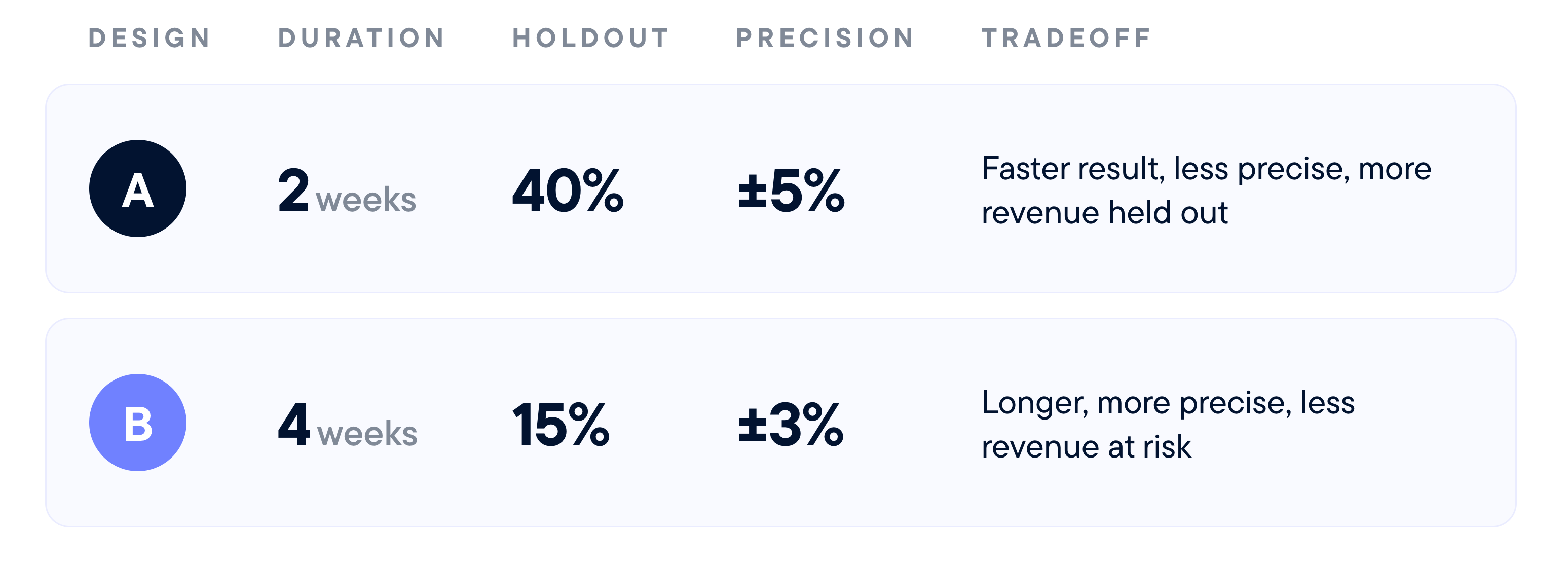
Both are valid for different businesses. You can take the recommended design or set custom constraints.
Phase 3: Validate before launch
Markets move. If a design is more than seven days old at launch, Northbeam re-runs its diagnostics on the most recent data before the test goes live:
- Do control and treatment groups still correlate strongly?
- Do the geos still pass every diagnostic test?
- Have seasonality or competitive conditions shifted?
- Do the statistical assumptions still hold?
If the design has degraded, Northbeam regenerates a fresh one from current data. You never launch a test built on last month's market.
Automated execution and contamination monitoring
Most incrementality tests don't fail because of poor design. They fail because something changes mid-flight.
Why manual geo tests break
Modifying targeting and spend across 100 campaigns and 25 holdout geos by hand creates a huge error surface: inconsistent timing, missed exclusions, and data-entry mistakes that invalidate results. Then drift sets in. A new campaign launches without the holdout exclusions, and contamination begins.
Northbeam integrates directly with ad platforms, so campaigns update automatically to reflect treatment and control groups when the test starts, and exclusions are monitored throughout.
Preventing "muddling spend"
Excluding holdout geos can push ad platforms to redistribute budget in ways you didn't intend. In a 20% holdout, the platform may try to spend 100% of your budget on the remaining 80% of the audience, which distorts the comparison. Northbeam sets budget constraints so treatment geos hold their usual spend levels.
Daily contamination checks
Once a test is live, Northbeam monitors daily against your MTA data and historical baselines:
- Spend validation: Is actual spend matching the design, or is spend leaking into holdout geos through new or reactivated ads?
- Campaign structure: Has a new ad set or campaign been added without the right geo exclusion?
- KPI disruptions: Have metrics moved unexpectedly versus pre-test baselines, suggesting something beyond the test is affecting results?
Because these checks measure real deviations from expected patterns, contamination gets flagged while you can still fix it (as opposed to after the fact).
From incremental ROAS to business decisions
A test result only matters if it answers a concrete question: should we scale this channel, pull back, or explain why incrementality disagrees with attribution?
Post-test verification
Before results reach your team, Northbeam confirms that:
- Designed spend levels and duration were achieved
- Confidence intervals are tight enough to support a real decision
- No late-stage contamination slipped through
- Statistical assumptions held for the full test period
Reconciling incrementality with attribution
Here's an illustrative result from a 4-week test with a 15% holdout:

The gap between platform-reported and incremental ROAS is exactly why the test exists. It shows how much of the credit a platform claims would have happened anyway.
Closing the loop: Calibrating MTA and MMM
Because the test was designed with MTA and, where relevant, retail data, its results slot straight back into your measurement system:
- Incrementality test → causal truth. The geo holdout isolates the true lift of each channel, including halo effects on Amazon and retail that attribution alone often misses.
- MTA reporting → calibrated KPIs. The iROAS result becomes a calibration factor applied to MTA, so ROAS and CAC reflect causal evidence.
- MMM+ → informed decisions. Lift results feed MMM+ to sharpen channel impact and saturation estimates.
Incrementality becomes your infrastructure for daily decisions.
Incrementality testing FAQ
What is incrementality testing?
Incrementality testing measures the revenue or conversions that would not have happened without a specific ad channel or campaign. It compares a group exposed to ads with a holdout group that isn't, so the difference reflects causal lift rather than correlation.
What is a geo holdout test?
A geo holdout test turns ads off in a set of geographic regions (the holdout) while running normally everywhere else. A 20% holdout means 20% of targeted regions see no ads. Comparing performance between the two groups reveals the channel's incremental impact.
What is incremental ROAS (iROAS)?
Incremental ROAS is the incremental revenue a channel generates divided by its spend. Unlike platform-reported ROAS, it excludes sales that would have happened anyway, so it's usually lower and more reliable for budget decisions.
How long should an incrementality test run?
Long enough to capture your conversion lag. Fast-converting performance channels like Meta can support shorter tests, while CTV and upper-funnel channels usually need longer ones. If most sales from a dollar arrive 30 days later, a two-week test will undercount incremental value.
What is minimum detectable effect (MDE)?
MDE is the smallest true effect a test is designed to reliably detect. Sizing it to your business ensures the test surfaces a meaningful result instead of noise.
What causes incrementality test contamination?
Contamination comes from mid-test changes: new campaigns launched without holdout exclusions, spend anomalies, conflicting promotions, or external market events. Daily monitoring of spend, campaign structure, and KPIs catches it early.
How does incrementality testing work with MTA and MMM?
Incrementality validates what works, MMM decides where to invest, and MTA guides daily optimization. Test results calibrate both, so attribution metrics and media mix models reflect causal evidence.
What to look for before you trust a result
Incrementality testing should reduce risk, not add it. The cost of a bad test isn't just wasted spend. It's lost trust, delayed decisions, and false confidence that leads to misallocated budget.
Combining granular MTA data with automated execution and continuous integrity monitoring keeps bad tests to a minimum. Because a technically valid test that doesn't inform a decision is just expensive validation.
Real incrementality tells you what to do next.
Want to run real incrementality tests? Book a demo with Northbeam today.